Research worksheet
A genealogy source worksheet for finding the same line again
By the Sankofagen editorial team · Published
You saved an image of page 4. A cousin wants to see the entry above the one you transcribed. Can you tell them which book to open? Try the four-line exercise below, then use the same worksheet on a document of your own.
1. Locate a line in an original image
Open the National Archives’ image of the first page of the Emancipation Proclamation. Near the top, a centered heading reads “A Proclamation.” Those two words identify the line on screen. They would make a poor file title on their own. The archive supplies a date, a series, a record group and an item identifier that let someone else open the same document.
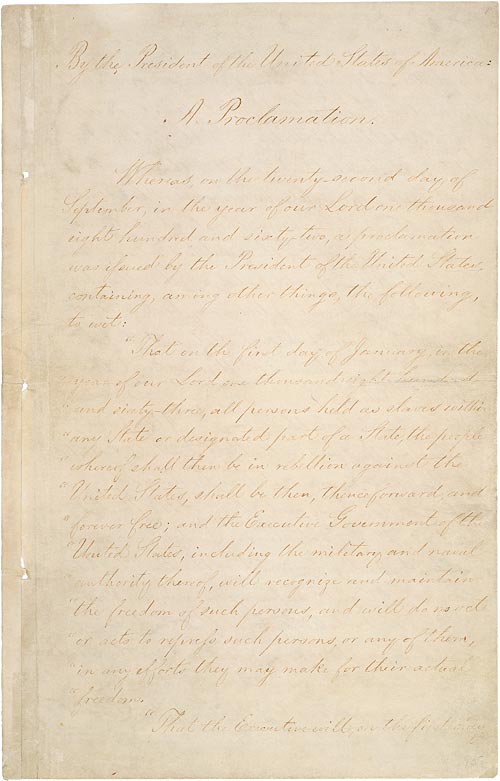
Emancipation Proclamation, January 1, 1863. Presidential Proclamations, 1791–1991. Record Group 11, General Records of the United States Government, National Archives. National Archives Identifier 299998. First manuscript image, centered heading near the top.
The National Archives record and transcript link to the full catalog item. The heading can be checked directly on the first image. It supplies no evidence about a particular family.
2. Find the parcel entry
These four entries belong to an invented classroom collection called Practice family letters. The numbers and wording were created for this exercise. The viewer counts images from the start of each book. The printed page is the number on the sheet itself.
| Book | Viewer image | Printed page | Line | Words on the line |
|---|---|---|---|---|
| A | 7 | 4 | 1 | Parcel sent |
| A | 7 | 4 | 2 | Parcel recieved |
| B | 9 | 4 | 1 | Parcel returned |
| B | 9 | 4 | 2 | Receipt filed |
Cover the last column and try the directions “page 4.” All four entries qualify. Add “book A” and two qualify. Now try “book A, image 7, printed page 4, line 2.” Uncover the words. The single matching line reads “Parcel recieved,” including the spelling slip. The different entry on page 4 of book B is why the book name belongs in your note.
Download the four practice entries as a CSV.
3. Separate the wording from your reading
- Transcription
- Parcel recieved
- Reading note
- I read “recieved” as “received.” The line gives neither a recipient nor an address.
- Next question
- Is there an addressed envelope or a dated letter that can be connected to this parcel?
The two entries on adjacent lines in book A might refer to the same parcel. There is no identifying number or name to join them. If a family tree already names a recipient, leave that name out of the transcription and record what evidence would support the connection.
4. Copy the worksheet for your next record
- Collection and keeper. Which archive, library or family collection holds it? Copy the title and the item or catalog number if one exists.
- Return address. Save the catalog link, date viewed, volume, printed page and image number. If the sheet has no printed number, write “unnumbered” and describe the position of the entry.
- Words on the page. Copy the relevant wording, preserving spelling. Mark anything you cannot read, then enter your interpretation separately.
- What still needs evidence? State one claim the line supports and one question it leaves open. Reopen the record from your note before filing it.
If your starting point is the Virginia county list, copy the county heading and the linked workplace page into your notes. Those details will help you retrieve the lead. The entry you eventually find in a register or letter needs its own citation. For more detail on arranging a federal citation, consult the National Archives’ guide to citing records.
Next reading. Open the Georgia county list and choose a place you are researching. What information on the linked page would help you identify a collection to consult next?
5. Correct an OCR error without losing the printed wording
On July 30, 1885, the Southwestern Christian Advocate printed an inquiry about Augustine Narcisse. Open the image of the inquiry from The Historic New Orleans Collection’s Lost Friends collection. Count printed lines from the one beginning “MR. EDITOR.” The second line contains two errors in a machine reading we ran on this image.
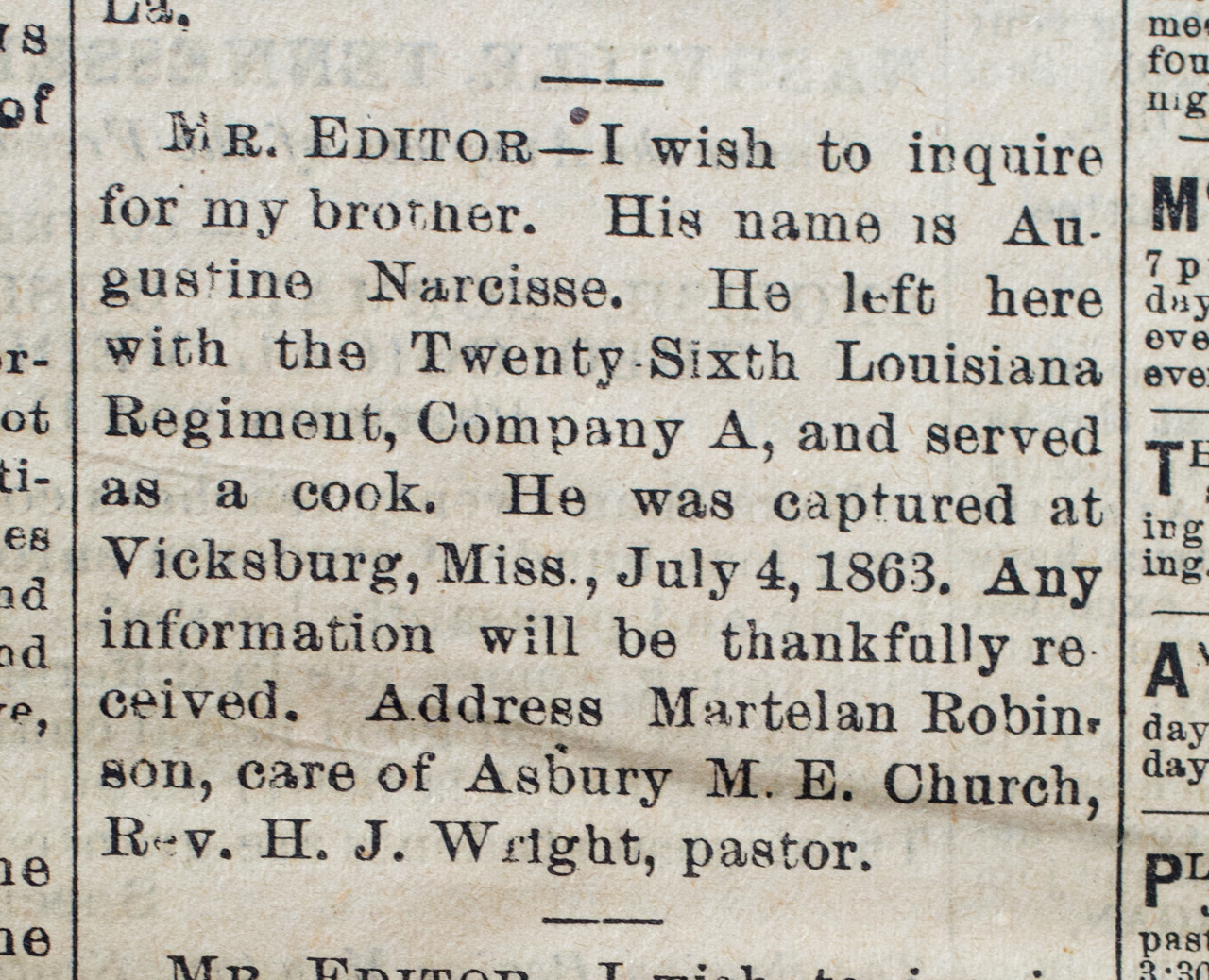
- Left side of line 2. The OCR returned
for my brorner.The scan readsfor my brother.
Keep the machine output in one column and the checked wording in another. “Brother” records the relationship claimed by the writer. - Right side of the same line. The OCR returned
His name 18 Au-. The image readsHis name is Au-
. Zoom out one line before recording the name. The third line startsgustine Narcisse.
In a line-by-line transcript, leave Au- at the end of line 2 and gustine at the start of line 3. Add Augustine Narcisse as a search form in a separate field. Joining a word for a search and correcting a misread letter are two different edits. The line numbers let a relative find the name on the scan even if a text search misses it.
The OCR correction log (CSV) contains both corrections and the separate search form. If you cannot read a letter, keep your uncertainty beside its line locator. The Illinois Newspaper Project’s correction instructions show how volunteers compare machine text with a newspaper image.